

To access any FNLB API, your application must include a valid Authorization header for each request. This ensures that only authorized clients can manage or interact with your account.

Authorization Header

All authenticated requests must include the following header:
Authorization: YOUR_API_KEY
Replace YOUR_API_KEY with the actual key generated in the FNLB app.
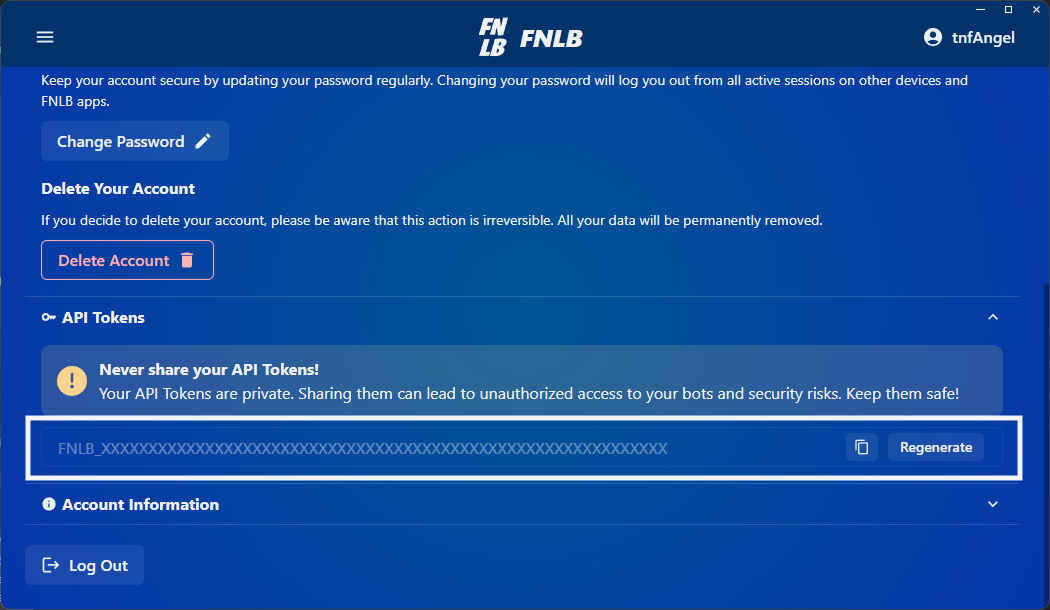
FNLB API Token
Never expose your API key in client-side code, public repositories, or browser environments. Treat it like a password. If your key is compromised, revoke it immediately.

Example Request

Here’s a sample curl request to get the list of your bots:
curl -X GET https://api.fnlb.net/bots \
  -H "Authorization: YOUR_API_KEY"
Successful Response (200 OK):
[
    {
        "parent": "7a85cbd3e019417e8b6fcd4e",
        "nickname": "f4d7e2c9a89b3c1a",
        "email": "lobbybot1@gmail.com",
        "id": "78a43c92b18f45c92de74aa2"
    }
]

Common Error Codes

If your request fails, the API will return an error code, here are the most common ones:
Error CodeDescriptionRecommended Action
net.fnlb.errors.common.invalid_requestThe request is malformed, missing required parameters, or contains invalid valuesVerify all required fields are provided, ensure the payload structure matches the API specification, and validate parameter formats before retrying.
net.fnlb.errors.common.unable_to_process_requestThe server was unable to process the requestRetry the request. If the issue persists, contact support.
net.fnlb.errors.common.invalid_body_fields_lengthOne or more request fields exceed or do not meet the required length constraintsValidate field lengths according to the API specification and resend the request.
net.fnlb.errors.common.rate_limit_exceededToo many requests sent in a given amount of timeReduce request frequency and implement exponential backoff before retrying.
net.fnlb.errors.common.limit_exceededA predefined system limit has been exceededReview applicable limits (e.g., number of bots, resource limits) and adjust your request accordingly.
net.fnlb.errors.common.unable_to_save_to_databaseThe server failed to persist data to the databaseRetry the request. If the problem continues, contact support.
net.fnlb.errors.common.update_requiredThe client version is outdated and must be updatedUpdate your application to the latest supported version before retrying.
net.fnlb.errors.common.maintenance_modeThe system is currently under maintenanceWait until maintenance is completed and try again later.
net.fnlb.errors.auth.invalid_tokenThe provided authentication token is invalidVerify the token and ensure it is correctly generated and included in the request headers.
net.fnlb.errors.auth.invalid_api_tokenThe provided API token is invalidConfirm the API token is correct and active. Regenerate it if necessary.
net.fnlb.errors.auth.unauthorizedAuthentication is required or has failedEnsure valid authentication credentials are included in the request.
net.fnlb.errors.auth.forbiddenThe authenticated user does not have permission to access the resourceVerify the user’s permissions and roles.
net.fnlb.errors.auth.user_bannedThe user account has been bannedContact support for clarification or appeal the ban if applicable.

Managing API Keys

  • You can generate and manage API keys from the FNLB App and Web Dashboard.
  • Keys are tied to your user account and inherited by your applications.
  • Revoking a key will immediately invalidate all requests using it.

Next Steps

API Reference

Learn how to control your bots using authenticated API calls.

OAuth2

Create third-party applications that can access FNLB resources.