> ## Documentation Index
> Fetch the complete documentation index at: https://developer-docs.fnlb.net/llms.txt
> Use this file to discover all available pages before exploring further.
# Authentication
> Learn how to securely access FNLB APIs using your API key. All requests require authentication via Authorization headers.
To access any FNLB API, your application must include a valid `Authorization` header for each request. This ensures that only authorized clients can manage or interact with your account.
***
### Authorization Header
All authenticated requests must include the following header:
```http theme={null}
Authorization: YOUR_API_KEY
```
Replace `YOUR_API_KEY` with the actual key generated in the FNLB app.
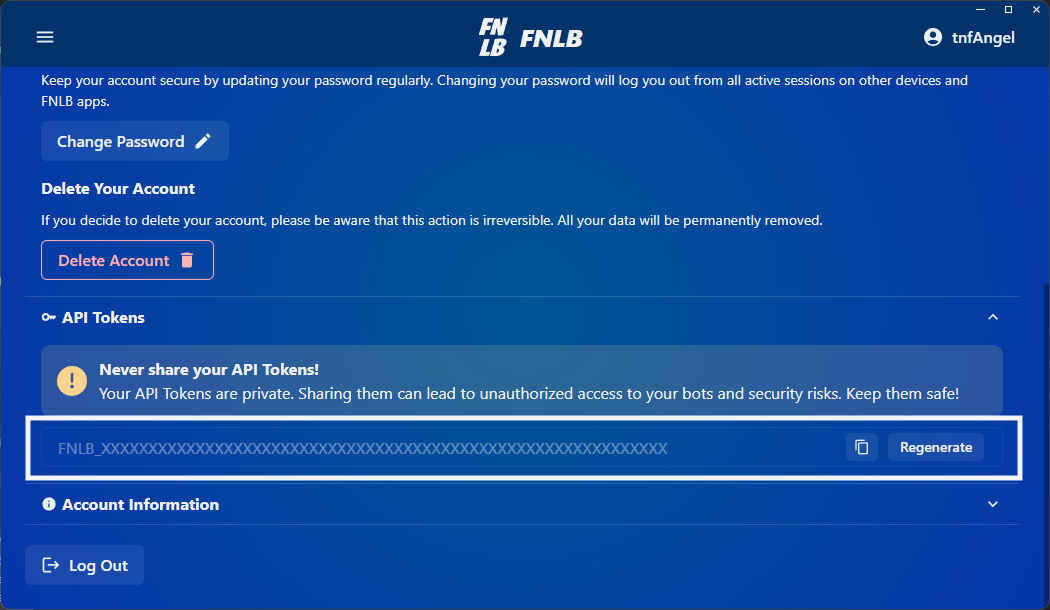
**Never** expose your API key in client-side code, public repositories, or browser environments. Treat it like a password. If your key is compromised, revoke it immediately.
***
### Example Request
Here’s a sample `curl` request to get the list of your bots:
```bash theme={null}
curl -X GET https://api.fnlb.net/bots \
-H "Authorization: YOUR_API_KEY"
```
**Successful Response (200 OK)**:
```json theme={null}
[
{
"parent": "7a85cbd3e019417e8b6fcd4e",
"nickname": "f4d7e2c9a89b3c1a",
"email": "lobbybot1@gmail.com",
"id": "78a43c92b18f45c92de74aa2"
}
]
```
***
### Common Error Codes
If your request fails, the API will return an error code, here are the most common ones:
| Error Code | Description | Recommended Action |
| :-------------------------------------------------- | :-------------------------------------------------------------------------------- | :--------------------------------------------------------------------------------------------------------------------------------------------------- |
| `net.fnlb.errors.common.invalid_request` | The request is malformed, missing required parameters, or contains invalid values | Verify all required fields are provided, ensure the payload structure matches the API specification, and validate parameter formats before retrying. |
| `net.fnlb.errors.common.unable_to_process_request` | The server was unable to process the request | Retry the request. If the issue persists, contact support. |
| `net.fnlb.errors.common.invalid_body_fields_length` | One or more request fields exceed or do not meet the required length constraints | Validate field lengths according to the API specification and resend the request. |
| `net.fnlb.errors.common.rate_limit_exceeded` | Too many requests sent in a given amount of time | Reduce request frequency and implement exponential backoff before retrying. |
| `net.fnlb.errors.common.limit_exceeded` | A predefined system limit has been exceeded | Review applicable limits (e.g., number of bots, resource limits) and adjust your request accordingly. |
| `net.fnlb.errors.common.unable_to_save_to_database` | The server failed to persist data to the database | Retry the request. If the problem continues, contact support. |
| `net.fnlb.errors.common.update_required` | The client version is outdated and must be updated | Update your application to the latest supported version before retrying. |
| `net.fnlb.errors.common.maintenance_mode` | The system is currently under maintenance | Wait until maintenance is completed and try again later. |
| `net.fnlb.errors.auth.invalid_token` | The provided authentication token is invalid | Verify the token and ensure it is correctly generated and included in the request headers. |
| `net.fnlb.errors.auth.invalid_api_token` | The provided API token is invalid | Confirm the API token is correct and active. Regenerate it if necessary. |
| `net.fnlb.errors.auth.unauthorized` | Authentication is required or has failed | Ensure valid authentication credentials are included in the request. |
| `net.fnlb.errors.auth.forbidden` | The authenticated user does not have permission to access the resource | Verify the user's permissions and roles. |
| `net.fnlb.errors.auth.user_banned` | The user account has been banned | Contact support for clarification or appeal the ban if applicable. |
***
### Managing API Keys
* You can generate and manage API keys from the **FNLB App** and **Web Dashboard**.
* Keys are tied to your user account and inherited by your applications.
* Revoking a key will immediately invalidate all requests using it.
***
## Next Steps
Learn how to control your bots using authenticated API calls.
Create third-party applications that can access FNLB resources.